

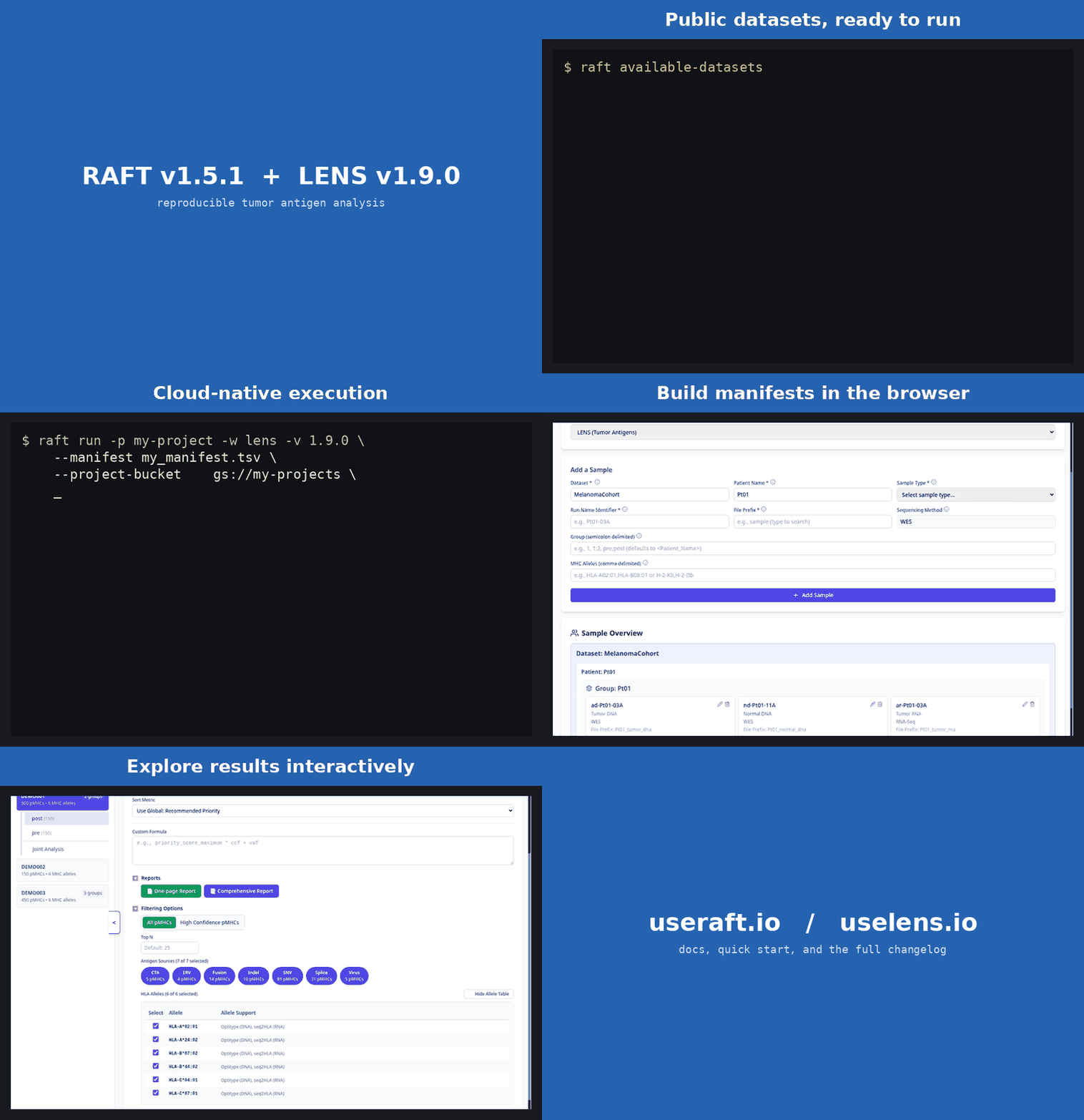
We’re excited to announce RAFT v1.5.1 (our Nextflow-based bioinformatics project manager) and LENS v1.9.0 (our tumor antigen prediction workflow). Together, these releases make LENS substantially easier to install and run while providing a more rigorously reviewed, higher-confidence set of tumor antigen candidates.
For new users, these releases substantially reduce the work required to install RAFT, configure LENS, and review results. For existing users, they add more robust cloud execution, automatic resource scaling, improved QC, and tiered antigen reports designed to distinguish the complete candidate set from the candidates supported by the strongest evidence.
These releases began with a conversation Brian Parker and I had over breakfast in early January. As we reflected on the previous year, I wasn’t satisfied with where RAFT and LENS stood in the immuno-oncology bioinformatics ecosystem. RAFT was not as portable as I wanted it to be, and LENS remained too difficult to run reliably.
RAFT and LENS had a small group of users who provided excellent feedback. However, we also suspected that other scientists had tried the tools, encountered installation or environment-specific problems, and moved on. Expanding the user base would not only make the tools useful to more researchers—it would also expose more edge cases, uncover more issues, and ultimately make both projects stronger.
Our goal for these releases was therefore straightforward: make RAFT and LENS accessible to scientists across a much broader range of bioinformatics experience.
That goal presented a practical challenge. The core development team is small: Brian and I develop RAFT and LENS alongside our other responsibilities in the lab. To accelerate development, we began using agentic coding models to assist with implementing, testing, and debugging selected changes. AI-assisted changes remain subject to human review and the same testing and validation standards as the rest of the codebase.
Below is a bird’s-eye view of the major improvements, followed by a more detailed discussion of their motivation, expected impact, and implementation.
Web-based manifest setup, workflow configuration, and interactive results review
Improved cloud support and streamlined commands
Automated RAFT dependency handling
Automatic sample-level resource scaling
Higher-confidence antigen prioritization
Expanded tumor characterization and QC
RAFT updates
RAFT (Reproducible Analyses Framework and Tools) is our Nextflow wrapper that creates and manages project-level environments for reproducible bioinformatics analyses. More information about RAFT can be found at useraft.io.
User experience enhancements
RAFT web UI — Users can now use a web-based UI to create sample manifests and configure workflows during
raft run, or to review project outputs withraft generate-reports. This also works in headless environments, as long as users can copy and paste data between the headless environment and a system with a web browser.Unified
raft run— RAFT now has a single entry point that replacesraft run-ots(previously used to create a project using an off-the-shelf workflow, like LENS) andraft run-workflow(previously used to run an already established project).Added
raft project-status— Users now have access to a project-level summary describing the project, the manifest, the project’s run status, and available outputs, if any.Improved reference download visuals — RAFT now provides a cleaner interface during reference file downloading.
Automated dependency installs and tests — RAFT dependencies (Nextflow, Git, and Singularity) can be automatically installed using
raft install-dependencies.Minimal profile generation — RAFT now provides users with a default Nextflow profile with sensible resource allocations to use on their local machine whenever RAFT cannot detect a user-defined Nextflow profile.
Faster module downloads — Project-specific module fetches are now faster thanks to adaptive throttling.
Improved workflow support
Workflow profiles — Workflows, such as LENS, can now support multiple configuration profiles when using
raft runwith the--workflow-profileparameter. Available workflow profiles can be discovered usingraft available-workflow-profiles.Patient filtering — RAFT now filters patients who do not meet a workflow’s minimum input requirements—for example, patients without an RNA-seq sample when one is required by LENS. Users can bypass this filtering with
--include-all-samples.Resource scaling — Resources are now allocated on a sample-by-sample basis based on input FASTQ size. This reduces failures caused by underallocated resources while avoiding unnecessary overallocation.
Better reference handling
raft download-refs— Users can now download references for a specific workflow (and version) without first creating a RAFT project.Cloud staging — References can now be staged to a specific cloud bucket (for use with
--references-bucket) without first creating a RAFT project.Improved duplicate-reference errors — Duplicate reference files (files or directories with the same name in different locations under
/path/to/raft/references) are now explicitly listed when a duplicate-reference error occurs.Safer reference generation — Lock-based reference generation prevents concurrent
raft run(orraft download-refs) commands from corrupting downloads.Mirrors for references — Several references now have fallback mirrors available in case the primary source goes offline. If mirrors fail, users can provide an alternative URL or local filesystem path (if the file is already available elsewhere).
Support for off-the-shelf immuno-oncology datasets
Off-the-shelf datasets — RAFT now supports running analyses on publicly available datasets by using
--datasetwithraft run.raft available-datasetslists available datasets, andraft download-datasetlets users download a dataset (FASTQs, metadata, and manifest) without creating a RAFT project. Currently, only Hugo et al., 2016 is available, though more datasets are planned.
Expanded cloud support
Formally supported hybrid mode — RAFT’s hybrid mode (local head node with cloud-based processing) is now formally supported. This has been tested extensively in GCP, but we’d like feedback on AWS support.
Multiple-bucket support — Hybrid mode now supports
--references-bucket(for RAFT reference files and aligner indexes),--fastqs-bucket(for input FASTQs), and--project-bucket(for project-specific files). This enables stable, shared buckets across projects, reduces load on the head node, and lets users isolate storage by bucket when desired.Resource labels — Hybrid mode emits user-customizable, cloud-provider-aware resource labels to help track costs and resource usage.
Output syncing — RAFT now copies relevant output files (e.g., QC data and LENS reports) back to the head node upon workflow completion.
BYOC (EXPERIMENTAL) — We are introducing a bring-your-own-cloud approach that is entirely web UI-driven and does not require installing RAFT on a head node. Note that this mode is under active development and is not yet recommended for production use.
Maintainability and CLI improvements
Module-based, not monolithic — Earlier versions of RAFT used a monolithic Python script. RAFT v1.5.1 now uses a module-based architecture, which should make debugging easier and help support new feature development.
Message of the day — RAFT now provides a message of the day (MOTD) when users are running either an out-of-date version of RAFT or an out-of-date workflow version.
Improved Nextflow support — RAFT now runs using Nextflow 26.04.6 instead of relying on older versions.
Reproducibility and archiving
Improved project tracking — RAFT now tracks not only the commands used to generate a RAFT project, but also changes made between runs (e.g., parameter changes, Docker image changes, or reference changes).
Improved documentation
Improved user-focused documentation — useraft.io now guides users through understanding and running RAFT for their purposes.
Code status — RAFT now provides automatically updated Pass/Fail/In Progress status indicators for workflows, datasets, subworkflows, and tool-level modules.
LENS updates
LENS (Landscape of Effective Neoantigen Software) is our tumor antigen prediction workflow, run through RAFT. LENS v1.9.0 improves execution efficiency, expands tumor characterization and candidate-level QC, and introduces tiered reports that make it easier to identify candidates supported by the strongest evidence.
Workflow improvements
Additional modular subworkflows — Previously hard-coded subworkflows (such as variant annotation with
snpEff) have been replaced with modular subworkflows to improve tool support.Simplified pMHC identifiers — LENS now assigns
candidate-idas a user-friendly unique identifier across pMHCs from various origins.Multiplier-aware modules — Tool-level module configuration files now support RAFT’s resource scaling functionality.
Seamless input handling
Lane merging — LENS now automatically merges FASTQs generated from the same library for use as workflow inputs.
Faster alignments
Faster DNA alignments — A new process pipes
bwa-mem2→samblaster→samtools sort, performing duplicate marking and coordinate sorting as part of the alignment stream rather than through separate post-processing steps.
Improved HLA typing
More robust HLA allele consensus calling — The
immunomodule now supports more combinations of HLA typing tools during consensus calling.Normalization of user-provided HLA alleles — User-provided alleles are now normalized internally to maximize compatibility with downstream tools.
Optimized
razers3call — Therazers3process has been updated to support parallel alignments instead of running FASTQs in series.
Expanded QC
Improved BAM QC —
qualimaphas been added and now runs on all generated BAMs. This helps validate analysis quality and prioritize tumor antigens.
Tumor characterization
Added LOH, APPM, and spliceosome mutation reporting — LOH, APPM, and spliceosome mutation status are now computed as part of LENS and reported in the project’s
outputs/directory. LOHHLA data has been moved to a separate sidecar output file.Improved purity estimates — The
sequenzaprocess has been updated to pull tumor purity from theconfintsfile rather than thealternative_solutionsfile. This should yield nearly identical purity estimates in most cases while following the recommended output fromsequenza.
Antigen-specific updates
Added viral integration detection — LENS can now optionally detect viral integration sites using DNA and RNA alignment data.
Improved evidence for splice variants — LENS now uses
regtoolsto detect cis-splice-effect variant associations. These associations are used for downstream pMHC filtering and help reduce false positives.Mouse splice variant support (EXPERIMENTAL) — Previous splice-variant tools used in LENS,
NeospliceandSNAF, do not explicitly support mouse samples. Our port ofSNAF,mSNAF, introduces mouse support, but it has not been thoroughly tested.Improved cancer/testis antigen gene set — LENS now uses an updated, annotated CTA gene set generated by Dr. Alex Rubinsteyn.
pMHC prioritization
vaxrankadded —vaxrank(https://github.com/openvax/vaxrank) now runs by default. Relevant columns fromvaxrankcan be found in the LENS reports.Alignment-based QC — Candidate peptides are now further scrutinized using alignment-based information such as read support, read quality, and mapping quality. More information can be found in the LENS evidence review specifications.
Multiple tiered LENS reports — LENS now emits a base LENS report (with all pMHC candidates), a “reviewed evidence” LENS report with deeper QC for each candidate, and a high-confidence LENS report containing pMHCs that pass high-confidence filters. More information on these reports can be found in the documentation covering LENS report interpretation.
Interactive reporting
Interactive web UI for results review — RAFT’s
generate-reportsfunction now provides users with an interactive web-based UI for reviewing sample-level QC and pMHC candidates, comparing candidates across timepoints or treatments, and generating PDF reports.
Improved documentation
Improved documentation flow — LENS documentation now provides users with a more direct path to installing and using RAFT for running the LENS workflow.
Interactive LENS flowchart — An interactive flowchart showing the default path through the LENS workflow has been added.
Code status page — Like RAFT, LENS now provides an automatically updated code status page for modules it uses.
Licensing updates
RAFT, LENS, and all modules maintained as part of these projects are now licensed under the Apache License 2.0.
We put a great deal of effort into these releases, and we hope that effort is reflected not in the length of the changelog, but in how much easier RAFT and LENS are to use. If you try them, we’d genuinely appreciate hearing what works, what doesn’t, and what would make them more useful for your research.
We would also like to thank Brad Nelson of Pathfinder Oncology for his many contributions to both RAFT v1.5.1 and LENS v1.9.0.
If you have questions, comments, or suggestions, please contact Steven Vensko II at steven_vensko@med.unc.edu or join us on the RAFT Slack server.